Dan
Dan2021. What an interesting year. With the world turned upside down by a pandemic that seemingly had its sights set on...

Improve PCI Compliance with File Integrity Monitoring
CSP
 Andy Vasey

Improve PCI Compliance with File Integrity Monitoring
File integrity monitoring (FIM) exists because change is unavoidable. From variations in a company’s hardware assets, software programs, configuration states, permissions, and personnel, it is the one constant within IT environments.
As such, FIM is considered a vital requirement for security compliance frameworks to help identify unexpected or malicious activity across critical system files and to protect business assets.
Monitoring critical system files, configuration files, and content files for unusual or unauthorized activity is one of the core requirements of PCI-DSS. Security teams can choose from any number of endpoint security tools to handle FIM for PCI compliance, but some solutions do more than others.
Threat actors often employ sophisticated malware to alter registry files and other critical data on enterprise servers for malicious purposes. Once they gain privileged access, they can compromise vital business data and personally identifiable information or disrupt mission-critical applications without being detected. This is the main reason security practitioners and IT teams in enterprises consider file integrity monitoring an important layer of defense against a range of malware and threat vectors.
To address PCI requirements, security teams employ FIM software that can monitor all file modifications, including additions (creation of new files), changes, and deletions, and alert specified personnel when unauthorized changes to files and directories occur. Without FIM, unauthorized changes can result in other security controls becoming ineffective, leading to stolen cardholder data without any perceived impact.
In this context, File Integrity Monitoring should be considered an essential security requirement, not just for PCI compliance, but to preserve the integrity of all Nonstop systems.
Key File Integrity Monitoring Concerns:
 Detecting suspicious activity and malicious attacks
The key concern for monitoring files is to quickly discover any external threats that might cause damage to your critical systems and applications.
 Identifying inadvertent or unwanted changes
Let’s face it, human error is inevitable, accidents happen, and users can unintentionally make changes that will detrimentally affect files. This is another great reason to ensure that you are monitoring your files.
 Complying with regulations
Of course, you must also check your files to comply with regulations such as PCI DSS, SOX, and GDPR. You must also have the ability to provide any reports requested by regulators.
Things to Look for When Assessing File Integrity Monitoring Tools
Enterprises should look for additional functionality in their file integrity monitoring solution. Those features should include:
- Pre-built, customizable compliance rules
- Support for different policies according to the device type
- Ability to revise a policy according to their individual requirements.
- Alerts for unauthorized changes
- Integration with enterprise security tools
- Customizable reports
Verify Elite: The Complete Solution for
File Integrity Monitoring & Compliance
 CSP has the perfect solution to help solve these issues and any others that you may encounter with regards to monitoring the integrity of your files.
Verify Elite® is the complete NonStop compliance and file integrity monitoring solution. It ensures that your NonStop System’s security (Guardian & OSS) meets industry standards and regulations such as PCI DSS, SOX, and GDPR, and is specifically designed to monitor changes to files and generate compliance reports.
Verify Elite’s recent enhancements include a simplified user interface, which makes it easier for you to address the critical file monitoring and compliance reporting requirements for PCI/GDPR. We’ve also added helpful tips across the product and made it even more intuitive to use.
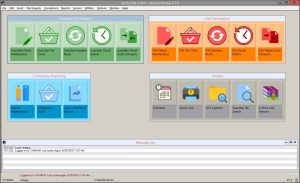
Enhanced User Interface
Verify Elite’s Security Compliance Monitor can ensure your compliance with regulations and internal security policies by performing regularly scheduled compliance checks.
And by executing regularly scheduled file integrity checks, Verify Elite’s File Integrity Monitor ensures that any unauthorized changes are immediately identified and reported.
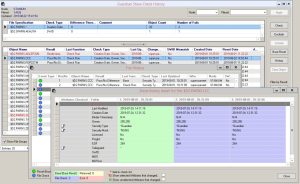
Guardian Result History Screens
What’s New in Verify Elite
Some key features included in the latest release of Verify Elite are the new “Binder Timestamp” flag for Guardian File Integrity Check and the EMS logging options.
Key Features:
- Pre-built customizable compliance rules
- Monitors both Guardian & OSS files
- Detailed compliance reporting
- Intuitive GUI makes compliance checking & audit reporting easy
- Meets PCI-DSS regulation 11.5
- Easily integrated with enterprise security tools
- Real time notifications with Alert-Plus
- Multi-Node Fileset Compare
The regular comparison of fileset across nodes should also be a part of the process to ensure the integrity of your files. Verify Elite’s Multi-Node Fileset Compare feature permits the comparison of filesets located either locally or across NonStop nodes. For example, files that are replicated to backup environments need to be regularly compared to production files to ensure their integrity.
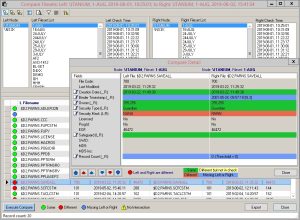
Guardian Fileset Result Compare Screen
CSP – The Superior Choice in NonStop Security
+1(905) 568 –8900